File: /home/aliazzsr/api.crm.vqode.com/vendor/yii2mod/yii2-swagger/README.md
<p align="center">
<a href="https://github.com/yiisoft" target="_blank">
<img src="https://avatars0.githubusercontent.com/u/993323" height="100px">
</a>
<h1 align="center">Swagger Documentation Generator for Yii2 Framework</h1>
<br>
</p>
Swagger/OpenAPI Documentation Generator for Yii2 Framework.
[](https://packagist.org/packages/yii2mod/yii2-swagger)
[](https://packagist.org/packages/yii2mod/yii2-swagger)
[](https://packagist.org/packages/yii2mod/yii2-swagger)
[](https://travis-ci.org/yii2mod/yii2-swagger)
Installation
------------
The preferred way to install this extension is through [composer](http://getcomposer.org/download/).
Either run
```
php composer.phar require --prefer-dist yii2mod/yii2-swagger "*"
```
or add
```
"yii2mod/yii2-swagger": "*"
```
to the require section of your composer.json.
Configuration
-------------
You need to configure two actions as follows:
```php
<?php
namespace app\controllers;
use Yii;
use yii\helpers\Url;
use yii\web\Controller;
/**
* @SWG\Swagger(
* basePath="/",
* produces={"application/json"},
* consumes={"application/x-www-form-urlencoded"},
* @SWG\Info(version="1.0", title="Simple API"),
* )
*/
class SiteController extends Controller
{
/**
* @inheritdoc
*/
public function actions(): array
{
return [
'docs' => [
'class' => 'yii2mod\swagger\SwaggerUIRenderer',
'restUrl' => Url::to(['site/json-schema']),
],
'json-schema' => [
'class' => 'yii2mod\swagger\OpenAPIRenderer',
// Тhe list of directories that contains the swagger annotations.
'scanDir' => [
Yii::getAlias('@app/controllers'),
Yii::getAlias('@app/models'),
],
],
'error' => [
'class' => 'yii\web\ErrorAction',
],
];
}
}
```
Usage
-------------
1) Creating a Controller
First, create a controller class `app\controllers\UserController` as follows:
```php
namespace app\controllers;
use app\models\User;
use yii\data\ActiveDataProvider;
use yii\rest\Controller;
/**
* Class UserController
*/
class UserController extends Controller
{
/**
* @SWG\Get(path="/user",
* tags={"User"},
* summary="Retrieves the collection of User resources.",
* @SWG\Response(
* response = 200,
* description = "User collection response",
* @SWG\Schema(ref = "#/definitions/User")
* ),
* )
*/
public function actionIndex()
{
$dataProvider = new ActiveDataProvider([
'query' => User::find(),
]);
return $dataProvider;
}
}
```
2) Creating `User` definition
You need to create folder `app/models/definitions` and add `User` definition class as follows:
```php
<?php
namespace app\models\definitions;
/**
* @SWG\Definition(required={"username", "email"})
*
* @SWG\Property(property="id", type="integer")
* @SWG\Property(property="email", type="string")
* @SWG\Property(property="username", type="string")
*/
class User
{
}
```
3) Configuring URL Rules
Then, modify the configuration of the urlManager component in your application configuration:
```php
'urlManager' => [
'enablePrettyUrl' => true,
'enableStrictParsing' => true,
'showScriptName' => false,
'rules' => [
'GET,HEAD users' => 'user/index',
],
]
```
4) Enabling JSON Input
To let the API accept input data in JSON format, configure the parsers property of the request application component to use the `yii\web\JsonParser` for JSON input:
```php
'request' => [
'parsers' => [
'application/json' => 'yii\web\JsonParser',
]
]
```
Trying it Out
-------------
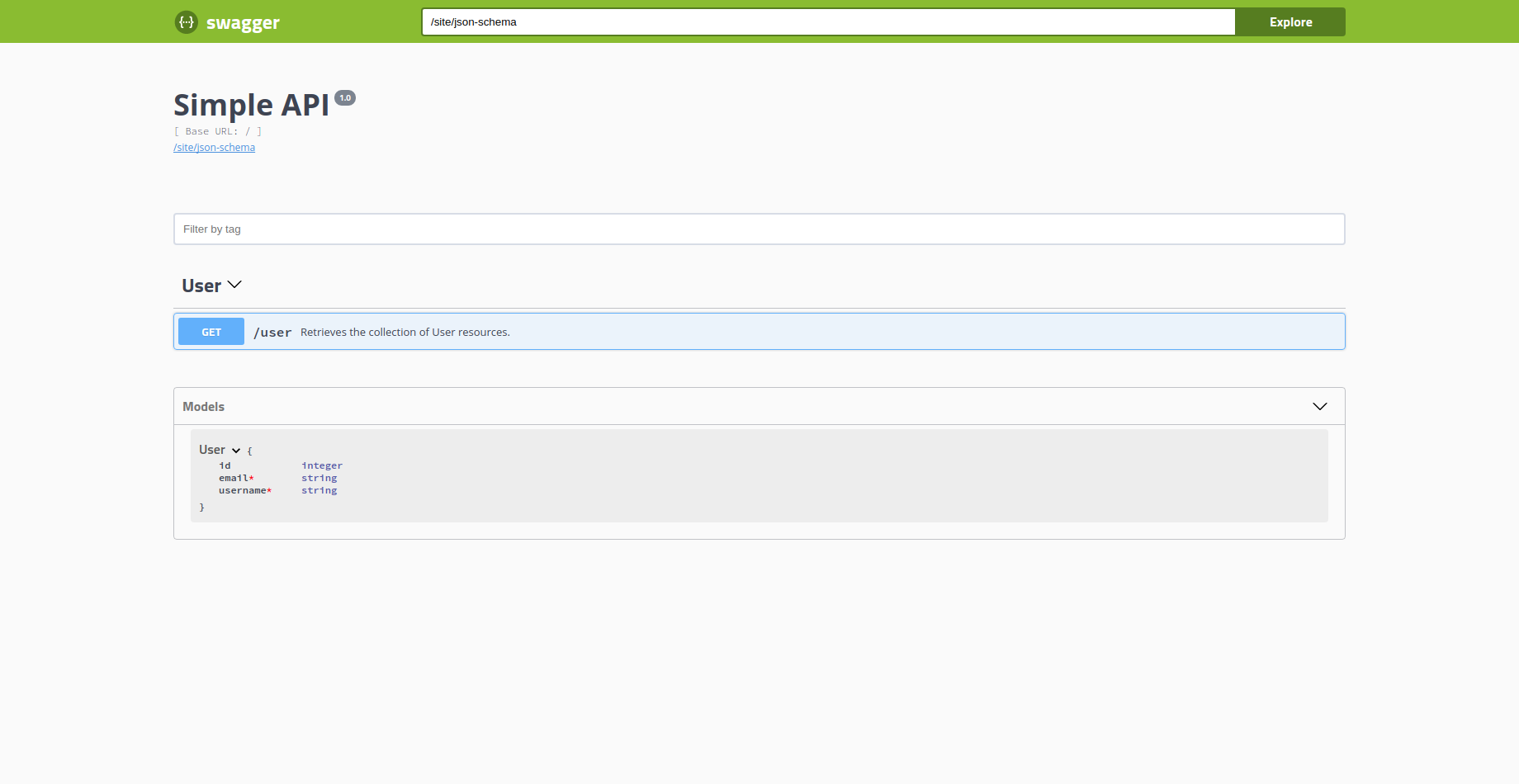
Now you can access to swagger documentation section through the following URL:
http://localhost/path/to/index.php?r=site/docs
**View in the browser**